.jpg&w=1080&q=75)
AI Lead Generation Engines for Solopreneurs: How to Capture and Qualify Leads 24/7 Without Coders

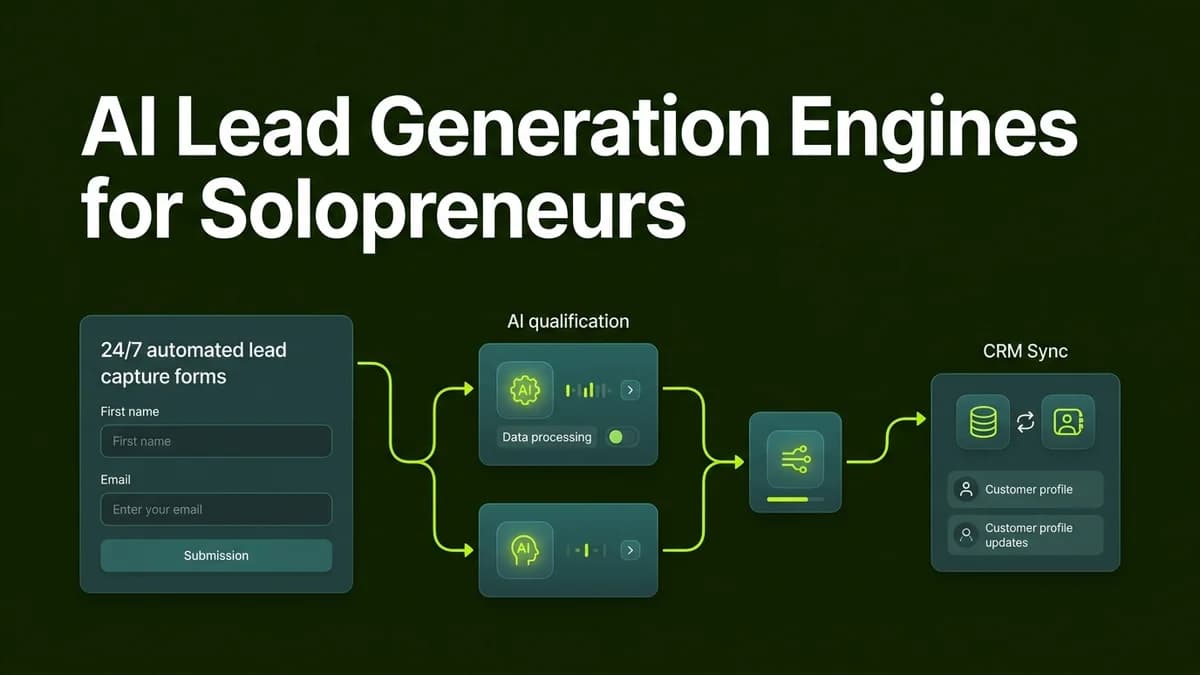
Solopreneurs can build automated AI lead generation engines by connecting website forms to ChatGPT via Make.com or n8n to instantly score, qualify, and respond to incoming inquiries 24/7 without coders.
For independent professionals, agency owners, and solopreneurs, capturing and qualifying potential clients rapidly is the single biggest driver of revenue growth. Traditional lead generation reliance on static contact forms creates a major delay. When a prospective buyer submits an inquiry, hours or days often elapse before a human owner reads the details, evaluates fit, and sends a initial response. In modern digital markets, slow response times lead directly to lost deals.
By constructing a lightweight, automated AI lead engine, non-technical business owners can capture incoming prospect information, automatically enrich key details, score buyer intent, and dispatch personalized responses within seconds of submission.
Why AI Lead Engines Outperform Traditional Contact Forms
Manual lead evaluation consumes valuable focus hours and causes delayed prospect engagement:
Lead Metric | Traditional Contact Form Process | Automated AI Lead Engine |
|---|---|---|
Speed to Lead | 4 to 24 hours average response latency | Under 30 seconds automated turn-around |
Prospect Qualification | Manual review of vague form responses | Automated intent scoring & budget verification |
Data Enrichment | Manual LinkedIn & website research | Automated company data & profile enrichment |
Follow-up Personalization | Generic template emails sent hours later | Custom AI responses tailored to prospect pain points |
Weekly Time Required | 8 to 12 hours spent filtering tire-kickers | Under 1 hour reviewing pre-qualified strategy calls |
The 3-Stage AI Lead Engine Architecture
Building an automated lead qualification system requires three visual automation stages:
[Intake Form Trigger] ──> [AI Data Enrichment & Lead Scoring] ──> [Multi-Channel Route & Dispatch]Stage 1: Intake Form Capture
The workflow initiates when a visitor fills out a contact or intake form on your website (built with Tally, Typeform, or Google Forms). Rather than sending a plain notification email, the form submission transmits a webhook payload into your automation platform (Make.com or n8n).
Stage 2: AI Data Enrichment and Qualification Scoring
The automation passes the form responses into an AI model like OpenAI ChatGPT-4o or Claude 3.5 Sonnet. The AI evaluates key criteria:
- Project Scope Clarity: Assessing whether the client requirement is clearly articulated.
- Budget Alignment: Verifying if the prospect meets minimum service pricing thresholds.
- Urgency & Fit: Scoring the prospect on a scale of 1 to 10 based on buying signals.
AI Lead Qualification Prompt Blueprint:
"You are an expert sales strategist for a digital consulting firm. Analyze the attached lead submission: Name: {Name}, Business: {Company}, Budget: {Budget}, Problem Statement: {Details}.
Tasks:
1. Assign a Lead Score from 1 to 10 based on project fit and budget alignment.
2. Identify 3 specific pain points mentioned.
3. Draft a polite 3-paragraph personalized reply acknowledging their project goals and offering a calendar booking link if score is 7+."
Stage 3: Multi-Channel Response and CRM Logging
Depending on the lead score generated by the AI:
- High Intent (Score 7-10): The workflow automatically logs the lead in Google Sheets or Notion, alerts the business owner via WhatsApp, and sends a personalized email containing a calendar booking link.
- Low Fit (Score 1-6): The workflow dispatches a polite nurture email providing free educational resources without clogging the owner calendar.
Step-by-Step Blueprint to Launch Your AI Lead Engine in 30 Minutes
Follow this practical sequence to implement your lead automation today:
- Build a Standardized Intake Form: Create a 4-question form on Tally or Google Forms capturing name, email, budget range, and primary business bottleneck.
- Create a Make.com or n8n Scenario: Set the initial trigger node to capture new form submissions automatically.
- Insert an OpenAI or Claude Node: Connect your API key and configure the Lead Qualification prompt blueprint shown above.
- Configure Conditional Routing: Add a router node to split actions based on the lead score output.
- Connect Gmail and WhatsApp Notifiers: Dispatch instant personalized email responses and direct WhatsApp notifications for high-priority leads.
Key Checklist for Optimal Lead Qualification
Ensure your system operates reliably with these operational checks:
- Always validate email formatting before passing inputs to AI nodes to prevent failed sends.
- Maintain clear minimum budget threshold options in form drop-downs to filter non-ideal clients early.
- Keep personalized email responses focused on client outcomes rather than generic promotional language.
- Review AI qualification scores weekly to refine prompt evaluation criteria as your business scales.
Frequently Asked Questions (FAQs)
Do I need programming skills to set up an AI lead generation engine?
No. You do not need coding knowledge. Platforms like Make.com and n8n allow you to build complete automation workflows using visual visual drag-and-drop nodes.
How much does running an automated AI lead engine cost per month?
For small businesses, running a lead engine on Make.com or self-hosted n8n costs between ₹500 and ₹1,500 per month, depending on total lead volume.
Can the AI lead engine connect to WhatsApp for instant alerts in India?
Yes. Official WhatsApp Business API integrations inside Make.com and n8n allow instant WhatsApp notification messages to be sent directly to your phone when high-value leads arrive.
Will prospective clients know the initial email was generated by AI?
When configured with detailed prompt instructions reflecting your authentic voice and specific business offerings, the generated email feels completely natural, professional, and helpful.

Learn to build AI workflows that handle your busywork — live sessions, real projects, zero code.
See the courseBeginner-friendly