.jpg&w=1080&q=75)
The Solopreneur’s Guide to AI Competitor Price & Stock Monitoring via Google Sheets

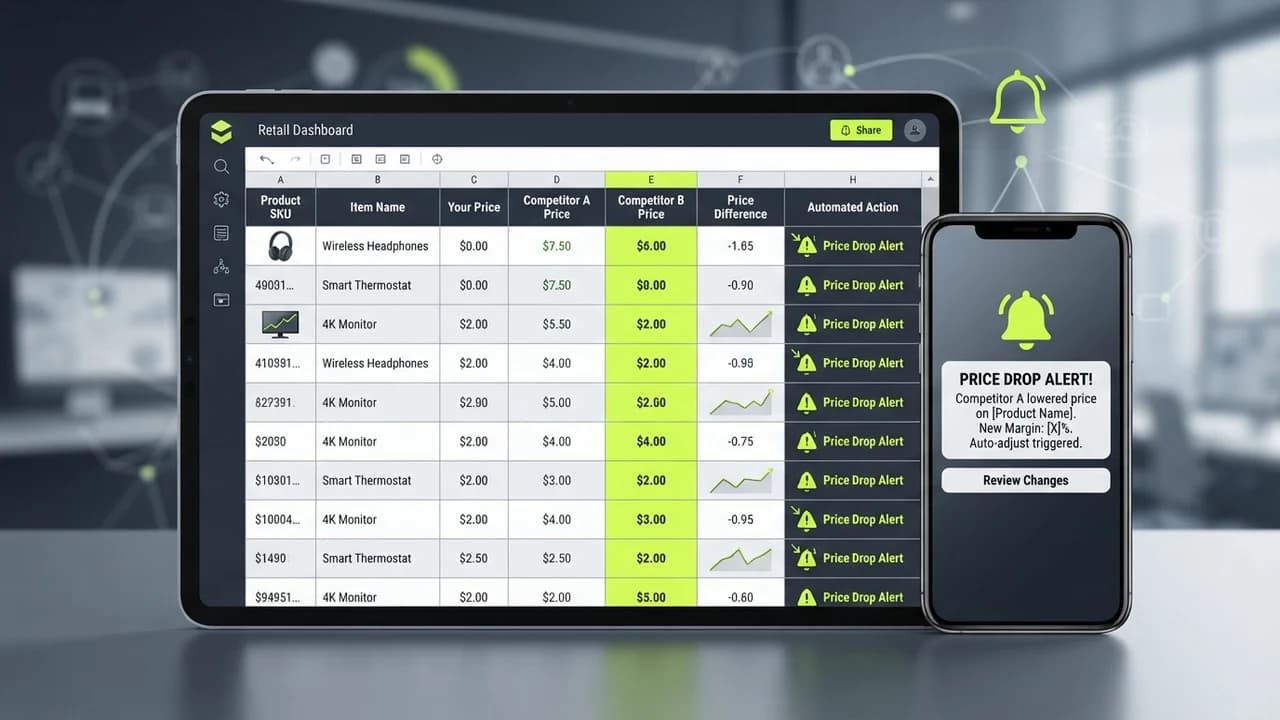
Indian e-commerce solopreneurs, Amazon sellers, and D2C brands can eliminate manual competitor research and protect their profit margins by setting up an automated competitor price and inventory monitoring engine using Google Sheets, free web scraping formulas, and Gemini Flash alerts.
Let us examine how most Indian online sellers track their competitors today.
Every morning, the seller opens twelve browser tabs:
- Tab 1: Their main competitor Amazon listing.
- Tab 2: A rival D2C brand Shopify website.
- Tab 3: Competitor product pricing on Blinkit or Zepto.
- Tab 4: Flipkart search results.
You spend twenty minutes manually checking whether your competitor dropped their price by ₹50, launched a buy-one-get-one promotion, or ran out of stock on their best-selling size.
This manual process is fundamentally flawed:
- It is Slow: By the time you notice a competitor launched a midnight flash sale, you have already lost fifty high-margin sales.
- It is Inconsistent: When you get busy with packaging orders or managing suppliers, competitor tracking gets abandoned for three weeks.
- It Misses Inventory Opportunities: When a major rival goes out of stock, that is your golden window to double your ad spend and capture their frustrated customers—but if you do not know they are out of stock, the opportunity vanishes.
Building an automated Competitor Monitoring Sheet solves this completely.
Using simple Google Sheets formulas combined with free Gemini API calls, your spreadsheet automatically scrapes rival prices twice a day, detects out-of-stock events, and pings your WhatsApp whenever an actionable market opportunity appears.
Manual Competitor Browsing vs Automated Google Sheets Monitoring
How automated pricing intelligence safeguards e-commerce revenue:
Intelligence Parameter | Manual Daily Tab Checking | Automated AI Google Sheets Monitor |
|---|---|---|
Daily Time Investment | 30 to 45 Minutes of tedious manual browsing | 0 Minutes (Runs automatically on Google cloud schedule) |
Tracking Frequency | Once every 24 to 48 hours (easily forgotten) | Scrapes pricing & stock data every 4 hours automatically |
Flash Sale Detection | Discovered hours after the sale launched | Instant WhatsApp notification within 15 minutes of price change |
Out-of-Stock Capitalization | Missed 80% of competitor inventory stockouts | Triggers automated alert: 'Rival out of stock, increase Meta ad spend' |
Operating Cost | Valuable founder time wasted daily | ₹0/Month (Uses free Google Sheets & free Gemini tier) |
The 3-Step Setup for Your Automated Price Monitoring Engine
1. The Google Sheets Formula Engine
Set up a clean spreadsheet with four columns: Competitor Name, Product URL, Target Selector, and Current Price:
- Use Google Sheets built-in =IMPORTXML() or free web scraping extensions like SheetGo to extract the live price element from public competitor product pages.
- Set up automated cell refreshing using Google Apps Script triggered every four hours on a headless schedule.
2. The Historical Price & Discount Delta Tracker
Do not just track today price; track trends:
- The script archives the morning and evening price into an historical ledger tab.
- If a competitor drops their price by more than 10%, a conditional formatting rule flags the row in bold red and calculates their discount percentage automatically.
3. Gemini Flash Synthesis & WhatsApp Opportunity Alert
When a price drop or out-of-stock event triggers:
- Google Apps Script sends the data to Gemini 3.6 Flash via free API:
- 'Competitor X dropped their 500g whey protein from ₹2,499 to ₹2,199. Analyze our gross margin if we match at ₹2,199 versus maintaining ₹2,399 while highlighting our clean ingredients.'
- Gemini analyzes the trade-off in two sentences and pings your WhatsApp:
- 'Alert: Competitor X dropped price by ₹300. Recommendation: Do not match price; maintain ₹2,399 and launch a ₹50 instant checkout coupon on WhatsApp to preserve 62% gross margin.'
Compete on Intelligence, Not Desperation
Small businesses cannot win against giant competitors by burning millions in blind price wars.
You win by moving faster, reacting with precision, and seizing market opportunities the second your competitors stumble.
With a simple automated spreadsheet working silently in the background, you operate with the market intelligence of a Fortune 500 retailer.
Frequently Asked Questions
Can Google Sheets scrape websites that use heavy JavaScript?
For websites that block basic XML import formulas, you can connect a lightweight free scraping service like ScraperAPI or a simple 10-line Python webhook hosted for free on Render.
Is scraping public competitor pricing legal in India?
Yes. Publicly visible retail product pricing and stock availability displayed openly to consumers on e-commerce storefronts can be monitored for commercial market research.
What is the maximum number of competitor URLs I can monitor for free?
A standard Google Sheet can easily monitor between 30 and 50 competitor product URLs multiple times daily without hitting any Google Apps Script quotas or paying for software.

Learn to build AI workflows that handle your busywork — live sessions, real projects, zero code.
See the courseBeginner-friendly