.jpg&w=1080&q=75)
Automating Daily WhatsApp Inventory Alerts from Google Sheets for Kirana & Retail Stores

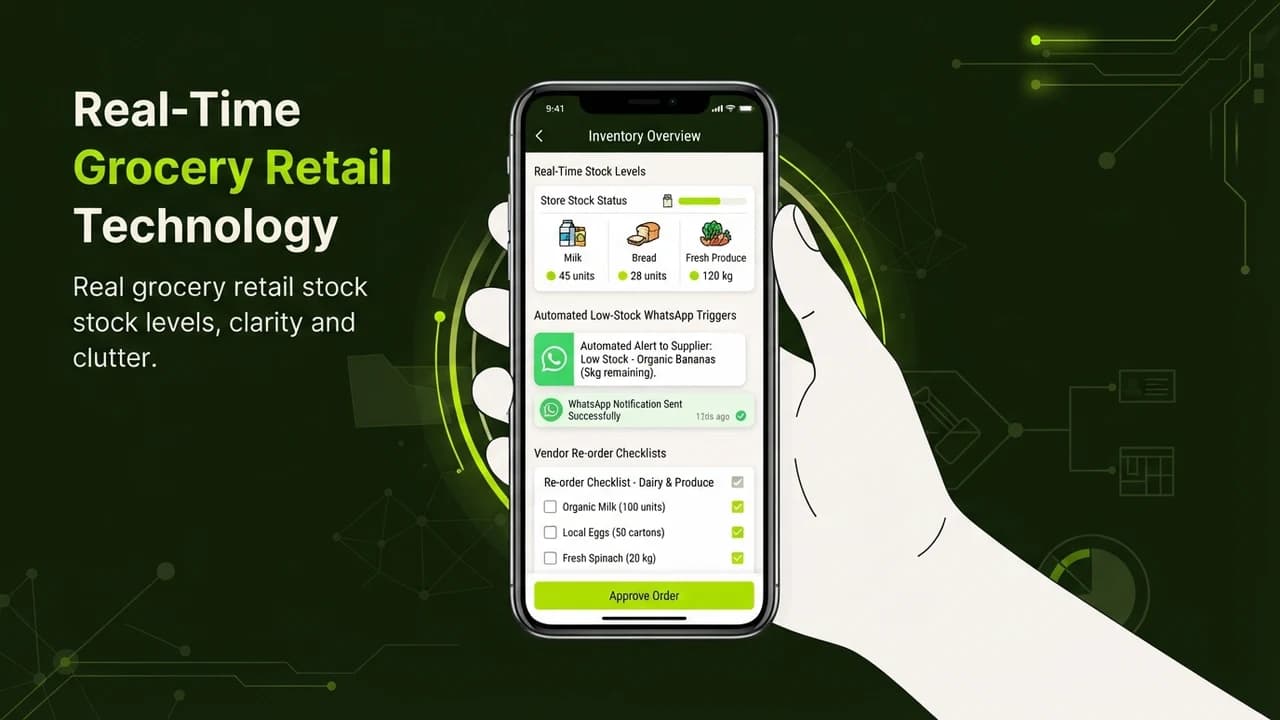
Local grocery stores, pharmacy retailers, and multi-brand Indian merchants can eliminate stockouts on high-demand essentials, eliminate frantic vendor phone calls, and automate distributor re-orders by linking Google Sheets inventory logs to automated WhatsApp supplier alerts for zero upfront software licensing costs.
Let us explore one of the most frustrating profit leaks in brick-and-mortar Indian retail.
It is The Out-of-Stock Emergency.
Consider how inventory management typically works in a local supermarket, electronics shop, or retail boutique:
- Fast-moving SKUs (like cold beverages during summer, cooking oil, or packaging tape) sell out during a busy Friday afternoon rush.
- The counter clerk notices the shelf is empty only when an impatient customer asks for it and walks away disappointed.
- The shop owner scrambled to locate the distributor's phone number, leaves multiple frantic voice notes, and learns the delivery truck will not arrive until next Tuesday.
- For four crucial shopping days, customers who came specifically for those essentials buy from a competitor down the street.
Traditional ERP and inventory software solutions like SAP or specialized retail software packages are expensive, complex to configure, and require extensive staff training that counter staff resist using.
On the other hand, virtually every Indian shop owner already knows how to enter daily purchases into a shared Google Sheet on their counter tablet or smartphone.
The missing link is Automated Low-Stock Triggering.
By connecting a simple Google Sheet to an automated WhatsApp notification bot, you turn a passive spreadsheet into an active supply chain manager.
Every evening at 9:00 PM, the automated system checks remaining inventory against minimum safety stock thresholds.
If any item dips below safe levels, it formats a clean re-order summary and dispatches draft purchase orders directly to your distributor on WhatsApp.
Manual Stock Tracking vs Automated WhatsApp Inventory Dispatch
How automated threshold monitoring safeguards retail cash flow and customer retention:
Inventory Dimension | Manual Chalkboard / Notebook Tracking | Automated WhatsApp & Sheets Engine |
|---|---|---|
Stockout Detection | Reactive: Discovered only after shelves are empty | Predictive: Flags items approaching safety threshold |
Supplier Communication | Frantic phone calls and handwritten slips | Clean, itemized WhatsApp purchase orders sent automatically |
Software Licensing Costs | ₹15,000 to ₹45,000 annual proprietary ERP fee | ₹0 Upfront (Google Sheets + Free automation tier) |
Staff Onboarding Time | Weeks of complex keyboard shortcut training | Zero: Counter staff simply update standard stock numbers |
Dead Stock Prevention | Poor: Capital locked in slow-moving expired stock | High: Automated flags for items sitting unsold over 30 days |
The 4-Step Architecture of the Retail Stock Bot
1. The Simplified Counter Google Sheet
Design a friction-free sheet that your counter team loves updating:
- Set up five simple columns: Item Name, Category, Current Stock, Minimum Safety Level, and Distributor WhatsApp.
- At the close of business each evening, your staff types the updated quantity of your 20 fast-moving items into the sheet.
- A calculated column automatically computes: Reorder Required = IF(Current Stock <= Minimum Safety Level, "YES", "NO").
2. The Evening Automated Sweep
Execute automated auditing without manual oversight:
- At 9:15 PM every evening, an automation workflow executes a scheduled scan across your Google Sheet rows.
- It filters all rows where Reorder Required equals YES.
- If zero items require restocking, the system remains silent, saving your attention for rest and family.
3. Vendor-Specific Order Grouping
Consolidate orders so distributors receive structured messages:
- If three different spice brands are low, the engine groups them by their shared FMCG distributor.
- It drafts an itemized, professional order slip:
- 'Namaste Mahaveer Traders! Automated stock order from Krishna Supermarket for tomorrow morning delivery:
- 1. Sunflower Oil 1L Pouch - 4 Cases (48 units)
- 2. Basmati Rice 5kg Bag - 10 Bags
- Please confirm dispatch time and send invoice on this chat.'
4. One-Tap WhatsApp Confirmation
Keep full executive control before orders go out:
- Rather than sending orders blindly to vendors, the bot pings the store owner's personal WhatsApp first:
- '3 distributors need restocking orders tonight. Tap below to approve and send.'
- With a single tap, the pre-formatted purchase orders transmit to the respective vendors instantly, ensuring deliveries arrive first thing the next morning.
Running a Resilient Retail Business Without Expensive Tech
You do not need to replace your existing shop systems or invest lakhs in heavy software to run an efficient, modern retail store.
A disciplined Google Sheet paired with automated WhatsApp alerts guarantees your shelves stay stocked with high-margin essentials, keeps your working capital flowing smoothly, and ensures your customers never leave empty-handed.
---
Frequently Asked Questions (PAA)
#### Can I use this for multiple branch stores?
Yes. You can create separate tabs in the Google Sheet for each branch location or include a Store Location column. The automation will aggregate stock levels per location and generate store-specific distributor delivery requests automatically.
#### Does the store owner need to keep a computer running all night?
No. The automation runs entirely in the cloud. Google Sheets lives on Google's servers, and cloud automation engines run independent background schedules. Your computer can be turned off, and your smartphone can be in silent mode.
#### How much does it cost to send automated WhatsApp messages?
If you route messages through standard WhatsApp automation gateways or your own business notification bot, sending internal operational alerts to yourself and trusted distributors costs virtually nothing, fitting easily within standard free-tier automation quotas.

Learn to build AI workflows that handle your busywork — live sessions, real projects, zero code.
See the courseBeginner-friendly