.jpg&w=1080&q=75)
ChatGPT Work vs ChatGPT Team: Which AI Plan Is Best for Small Business Teams in 2026?

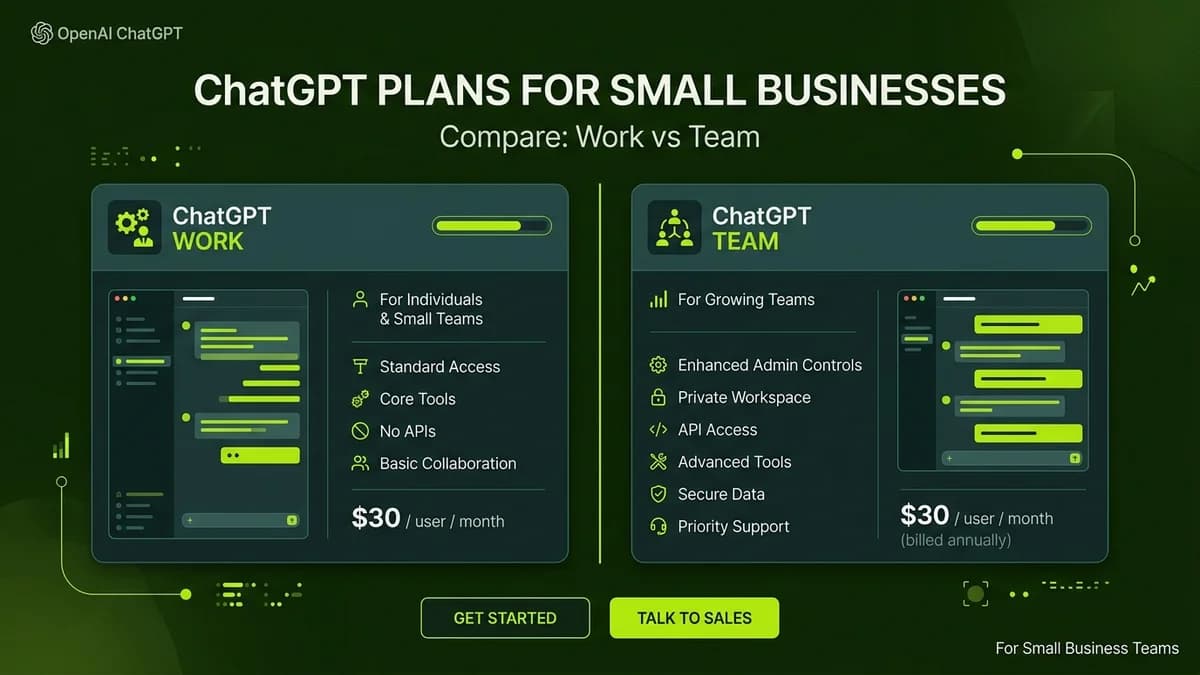
ChatGPT Work is designed for multi-department organizations requiring centralized administrative controls and custom app connectors, while ChatGPT Team offers a flexible, lower-cost workspace solution ideal for small business teams up to 148 seats.
Selecting the right AI subscription plan for a growing small business or digital agency requires balancing seat pricing, team memory features, custom GPT sharing, and strict data privacy protections. With OpenAI offering dedicated business environments alongside standard individual subscriptions, non-technical founders must evaluate whether ChatGPT Team or ChatGPT Work aligns best with their operational workflow.
Both plans enforce enterprise privacy rules ensuring company files and prompts are never used to train public AI models. However, key operational differences exist regarding user management, custom integrations, and administrative deployment options.
ChatGPT Work vs ChatGPT Team: Feature Comparison
The table below outlines the core operational differences between ChatGPT Team and ChatGPT Work for business decision-makers:
Feature & Capability | ChatGPT Team Plan | ChatGPT Work Plan | Ideal Business Fit |
|---|---|---|---|
Per-Seat Monthly Pricing | ~$25 / seat / month (billed annually) | Custom business seat pricing | Small teams seeking flexible budgeting |
Team Workspace Environment | Included (Shared GPT repository) | Included (Advanced admin console) | Both support secure team collaboration |
Model Access | GPT-4o, o1, & lightweight models | GPT-4o, o1, & custom enterprise models | High-frequency daily business workflows |
Data Privacy & Model Training | 0% training on business data | 0% training on business data | Enforces 100% strict corporate privacy |
Custom App Connectors | Standard GPT Actions | Custom API & enterprise connectors | Teams integrating custom internal databases |
Administrative Controls | Basic user invite & seat management | Advanced role-based access & SSO | Admin governance across multiple teams |
Key Differences Explained for Non-Technical Founders
1. Pricing Structure & Budget Flexibility
ChatGPT Team is structured specifically for small businesses, agencies, and consultancies wanting predictable monthly costs. It offers an affordable entry point per user without requiring high annual contract commitments.
ChatGPT Work is tailored for larger organizations requiring customized seat tiers, centralized billing across multiple business departments, and dedicated account support.
2. Custom GPT Repository & Shared Memory
Both plans enable non-technical team members to build custom GPT assistants—such as customer support reply drafts, proposal analyzers, or weekly status aggregators:
- ChatGPT Team: Team members share custom GPTs within a private company workspace directory with simple click-to-publish permissions.
- ChatGPT Work: Admins control granular access permissions, restricting specific custom GPTs (like payroll or HR assistants) to authorized personnel.
3. Data Privacy & Compliance Safeguards
Both business plans resolve the primary security concern of small business owners: data leakage.
Privacy Guarantee Summary:
- Prompts and uploaded documents remain private.
- Zero company data is used to train public OpenAI models.
- Workspace data is encrypted at rest and in transit.
How to Choose the Right Plan for Your Team
Follow these practical guidelines when deciding between the two plans:
- Choose ChatGPT Team If: Your business has between 2 and 148 team members, requires standard custom GPT sharing, and wants immediate self-service setup without custom sales calls.
- Choose ChatGPT Work If: Your company requires Single Sign-On (SSO), advanced audit logs, role-based document access, and deep custom API integrations into proprietary software.
Frequently Asked Questions (FAQs)
Can I upgrade from ChatGPT Team to ChatGPT Work later?
Yes. Organizations can start with ChatGPT Team for immediate deployment and transition to ChatGPT Work as team headcount and security control requirements expand.
Are documents uploaded to ChatGPT Team stored securely?
Yes. Files uploaded to ChatGPT Team are encrypted and stored inside your isolated business workspace, ensuring external users and public models cannot access internal documentation.
Do team members need coding skills to use ChatGPT Team?
No. ChatGPT Team features a user-friendly conversational interface allowing non-technical employees to summarize PDFs, generate copy, and analyze data using simple English instructions.

Learn to build AI workflows that handle your busywork — live sessions, real projects, zero code.
See the courseBeginner-friendly