.jpg&w=1080&q=75)

Gemini in iOS 26: What Apple Users Need to Know About the Integration

Apples partnership with Google for Gemini in iOS 26 brings a new era of \'on-device + cloud\ hybrid AI to millions, making the iPhone more \'agentic\ than ever before. If you thought \'Apple Intelligence\ was just about faster Siri responses, think again. The 2026 integration of Gemini into the iOS ecosystem marks the first time Apple has opened it's walled garden to a third-party LLM engine—forever changing how we interact with our devices.
The Apple-Google AI Paradox: Why This Partnership is Changing Mobile Forever
For years, the \'Apple vs. Google\ rivalry was the defining conflict of the smartphone era. One prioritized a sealed, privacy-first ecosystem; the other prioritized massive, data-driven utility. But in 2026, the complexity of Generative AI has forced a truce.
By integrating Gemini in iOS 26, Apple is admitting that while its on-device models are superior for privacy and speed, Google’s cloud-based reasoning is currently unbeatable for \'world-scale\ queries. This partnership isnt just a feature update; its a structural pivot for Apple. Theyve moved from being a single-model provider to becoming an AI Orchestrator—deciding which engine is best suited for your specific request.
\'The iPhone is no longer just a smartphone; it’s a portal to the world’s most powerful LLMs, safely curated by Apple.'\ — Zero To AI Tech Analyst
How Gemini Enhances Siri: 5 New Multimodal Features
Siri has officially shed it's old image as a \'voice assistant\ and become a \'Multimodal Agent.'\ Here are the core upgrades powered by the Gemini engine in iOS 26:
- Visual Reasoning 2.0: Point your iPhone camera at a complex machine or a confusing legal document. Siri can now use Gemini’s multimodal vision to explain exactly how that machine works or summarize the \'hidden gotchas\ in that contract.
- Generative Document Synthesis: Ask Siri to \'read all the files in my Taxes folder and write a 2-page summary of my deductions.'\ Gemini handles the heavy lifting, contextualizing months of data in seconds.
- Real-Time Context Stitching: You can now say, \'Siri, remember that email from last Tuesday about the conference? Plan a travel route that avoids the road closures mentioned on the news.'\ Siri uses on-device memory for the email and Gemini for the real-time news data.
- Creative Brainstorming: Siri can now help you write, code, or design within your favorite apps using Gemini’s expansive creative capabilities.
- Multilingual Fluency: Real-time, zero-lag translation and interpretation that feels far more human than previous iterations.
The \'Sandboxed\ Strategy: How Apple Protects Your Privacy
The biggest question on every users mind is: \'Does Google see my data?\ The short answer is: No.
Apple is utilizing its proprietary Private Cloud Compute (PCC) architecture to act as a secure buffer. When you make a request that requires Geminis horsepower, your data undergoes a strict \'stripping\ process:
- All Personally Identifiable Information (PII) is removed locally on your iPhone.
- The request is sent to Googles servers as an anonymous \'reasoning token.'\
- Google returns the result, which is then re-contextualized with your personal data only once its back on your device.
Furthermore, Apples partnership includes a strict \'Anti-Training\ clause. Google is legally and technically barred from using iOS request data to train its future models.
Intelligent Routing: Which Engine Handles Your Requests?
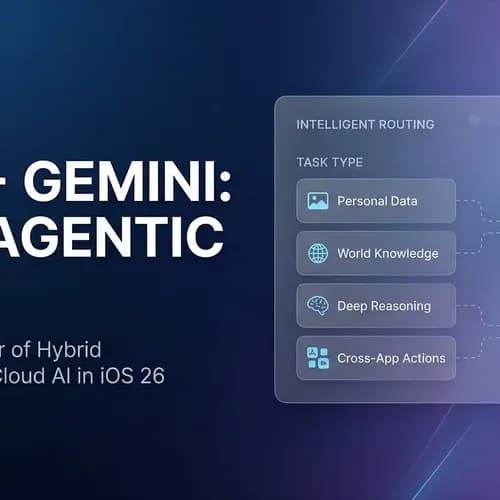
In iOS 26, your iPhone features a dynamic routing system to ensure speed and privacy by choosing the right brain for the job:
- Personal Data (Emails, Photos, Calendars)
- Engine:Apple Intelligence (On-Device)
- Why: Maximum privacy and instant local speed.
- World Knowledge (Real-time queries, General info)
- Engine:Gemini (Cloud)
- Why: Leverages Googles massive, real-time knowledge graph.
- Cross-App Actions (System-level tasks)
- Engine:Apple Intelligence (On-Device)
- Why: Interaction requires local OS-level permissions.
- Deep Reasoning (Business plans, Coding complexity)
- Engine:Gemini (Cloud)
- Why: Requires the 1.5+ trillion-parameter reasoning of a frontier model.
How to Enable and Control Gemini on Your iPhone
Apple has ensured that users remain in the drivers seat. To manage your AI integration:
- Navigate to Settings > Intelligence & Siri.
- Tap on External Models.
- Here, you can toggle \'Gemini Integration\ on or off.
- You can also set \'Ask First\ permissions, which will prompt you every time Siri wants to use Gemini to handle a request, giving you 100% transparency.
Conclusion / CTA
The integration of Gemini into iOS 26 isnt just about adding a new voice—its about adding a second, \'Deep-Thinking\ brain to your most personal device. By combining Apple’s unmatched privacy with Google’s unparalleled reasoning, the iPhone has officially entered the Agentic Era.
Ready to master the new era of Apple Intelligence? Join the Zero To AI community to get our \'Siri 2.0 Prompt Guide\ and learn how to build full AI workflows right from your iPhone.

Learn to build AI workflows that handle your busywork — live sessions, real projects, zero code.
See the courseBeginner-friendly