.jpg&w=1080&q=75)
Google Workspace + Gemini AI: The Practical Productivity Blueprint for Indian Agency Owners in 2026

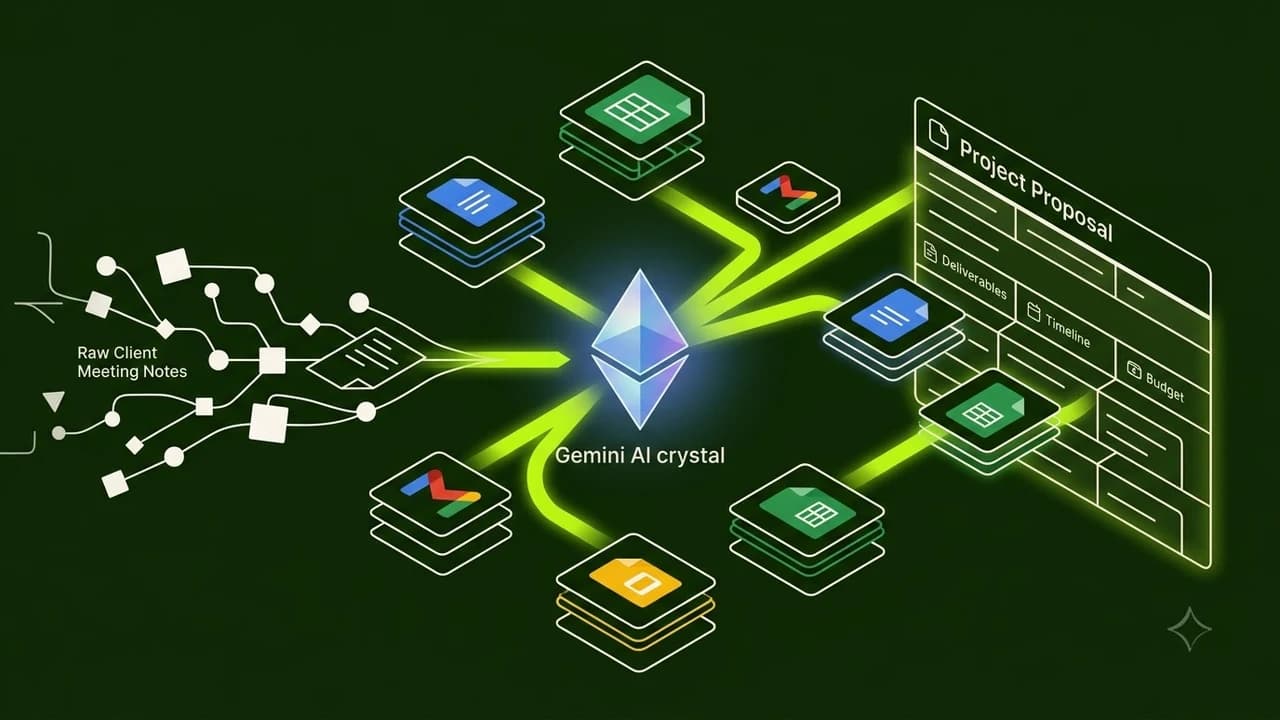
Indian digital marketing and development agency owners can save 15+ hours weekly by integrating Gemini AI directly into Google Workspace to draft client proposals in Docs, summarize email threads in Gmail, and organize project trackers in Google Sheets without third-party plugins.
Managing an agency in India involves juggling multiple client WhatsApp groups, endless Google Meet calls, custom pitch decks, and delayed invoice follow-ups.
Most founders waste half their workday switching between six different browser tabs and manually copying meeting notes into task management spreadsheets.
With Gemini AI built natively into Google Workspace, your daily office software becomes an autonomous operational assistant.
Instead of hiring additional project coordinators or paying for expensive third-party AI extensions, agency leads can execute complex document and client workflows directly inside standard Google tools.
The Google Workspace + Gemini Advantage
Here is how native Gemini integration compares to messy third-party copy-paste workflows:
Agency Workflow | Traditional Disconnected Process | Native Google Workspace + Gemini AI |
|---|---|---|
Client Meeting Minutes | Re-listening to 45-minute recording and typing summary | 1-Click automated meeting transcript summary in Google Docs |
Pitch Proposal Creation | Copying templates from past folders (3 hours) | Gemini drafts customized 5-page proposal in Docs from brief in 60 seconds |
Long Email Thread Catch-Up | Reading 25 back-and-forth client emails | "Help Me Write" generates 3-bullet executive summary inside Gmail |
Project Budget & Resource Tracking | Writing manual VLOOKUP formulas in Sheets | Natural language prompt generates structured tracking formulas instantly |
Client Confidentiality | Pasting private client data into public web chatbots | Enterprise-grade Google Cloud data privacy (data is never trained on) |
3 Daily Agency Workflows to Automate Today
Workflow 1: Instant Client Meeting Minutes & Action Items in Docs
After finishing a Google Meet consultation with a client:
- Open Google Docs and click the Gemini "Help Me Write" icon.
- Prompt: "Summarize our 30-minute client discovery call. Extract: Core Deliverables, Agreed Timelines, Budget Scope in INR, and Action Items assigned to both parties."
- Within 10 seconds, you have a professional executive summary ready to email to the client before they even leave their desk.
Workflow 2: Automated Custom Pitch Proposals in Docs
When pitching a new marketing retainer or web development project:
- Create a bulleted 4-line project brief in Google Docs (Target Audience, Goals, Deliverables, Price).
- Highlight the brief and ask Gemini to expand it into a formal statement of work (SOW).
- Gemini generates professional scope descriptions, milestone breakdown tables, and payment terms formatted cleanly with heading hierarchies.
Workflow 3: Smart Formulas and Lead Categorization in Sheets
If you manage client lead generation campaigns with messy form export sheets:
- Open Google Sheets and click the Gemini side panel.
- Ask in plain English: "Categorize leads into Tier 1, Tier 2, or Tier 3 based on whether column D contains an enterprise domain and column E exceeds ₹50,000 budget."
- Gemini writes and applies the exact formula across all rows automatically.
Enterprise Security & Client Data Protection
A major risk for Indian agency owners is leaking proprietary client marketing strategies into public AI models.
When using Gemini within a paid Google Workspace enterprise domain, your data remains strictly governed within your private organization perimeter. Google does not use your client emails, documents, or spreadsheets to train public foundation models.
Frequently Asked Questions
What is the cost of adding Gemini to Google Workspace in India?
Google Workspace offers Gemini business add-ons starting around ₹1,600 to ₹2,000 per user per month, easily offset by saving 15+ hours of billable founder time each week.
Can Gemini understand Hindi or Hinglish notes in Google Docs?
Yes. Gemini seamlessly processes and translates mixed Hinglish meeting notes, converting casual spoken transcripts into polished formal English business proposals.
Do I need coding skills to use Gemini in Google Sheets?
No. You interact with Gemini entirely using conversational natural language prompts, eliminating the need to memorize complex Excel or Sheets formulas.

Learn to build AI workflows that handle your busywork — live sessions, real projects, zero code.
See the courseBeginner-friendly