.jpg&w=1080&q=75)
How Indian Agency Owners Automate Client Onboarding in 15 Minutes Using AI

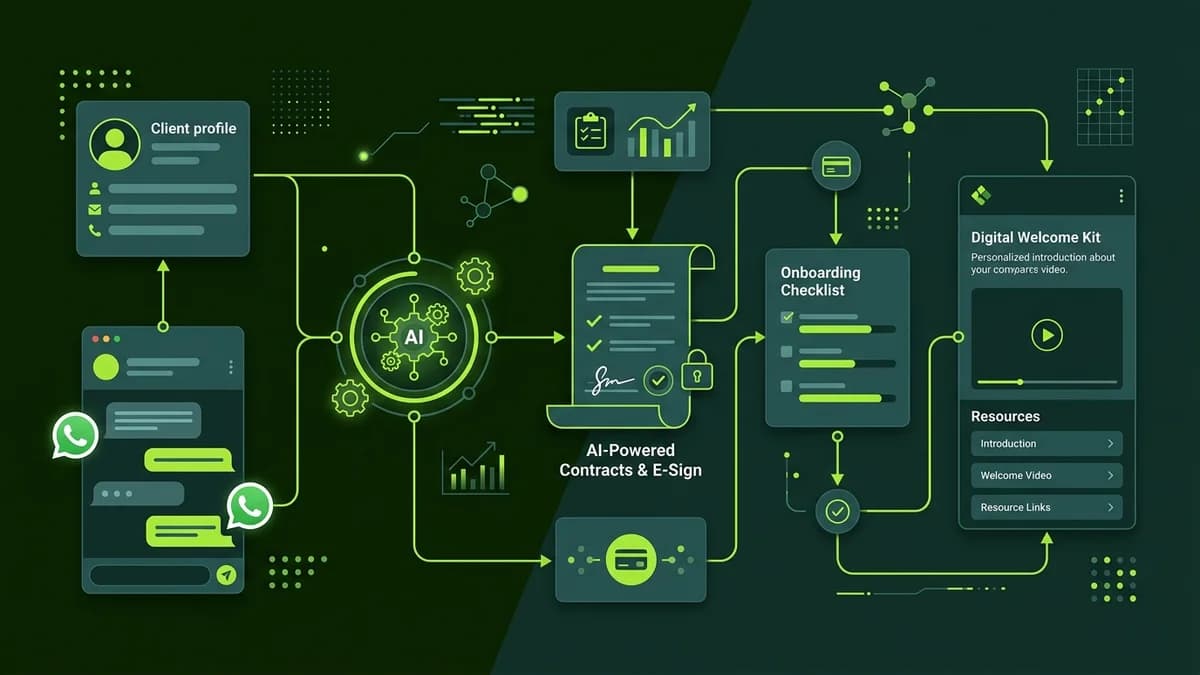
Indian agency owners can automate client onboarding by linking Tally or Google Forms to Google Drive and WhatsApp via Make.com or n8n, turning signed client agreements into instant project folders and welcome kits within 15 minutes.
For growing digital agencies, social media consultancies, and IT service providers across India, onboarding a new client often involves a tedious sequence of manual administrative tasks. Following contract signature, agency teams spend hours sending invoice requests, creating shared Google Drive folders, setting up Slack or WhatsApp communication channels, and collecting project briefs.
When client onboarding lags, early project momentum slows down. Building an automated AI onboarding workflow eliminates manual administrative friction, impressing new clients from day one while freeing account managers to focus on strategy.
Why Manual Client Onboarding Slows Agency Growth
Manual client setup creates administrative overhead that limits agency scalability:
Onboarding Stage | Manual Agency Process | Automated AI Onboarding Engine |
|---|---|---|
Initial Kickoff Time | 24 to 48 hours post-payment | Under 15 minutes automated turn-around |
Document Storage | Scattered files in email threads | Auto-created, organized Google Drive folders |
Client Brief Collection | Multiple follow-up emails for missing details | Automated WhatsApp & email reminders until filled |
Team Project Setup | Manually creating Slack channels & boards | Instant auto-provisioning of team workspaces |
3 Core Modules of an Automated Onboarding Workflow
Building an automated onboarding pipeline requires linking three visual components:
[Payment / Contract Signal] ──> [AI Brief Parsing & Document Creation] ──> [WhatsApp & Drive Setup]Module 1: Payment & Agreement Trigger
The workflow initiates immediately when a new client pays their retainer invoice (via Razorpay, Stripe, or bank transfer) or signs an e-agreement.
Module 2: AI Brief Parsing & Folder Generation
Once payment is confirmed, an automated workflow triggers an AI model to structure the client details:
- Automatically create a dedicated Google Drive parent folder with structured sub-folders (
01_Briefs,02_Assets,03_Deliverables). - Route the client brief through ChatGPT to summarize core goals, key deliverables, and deadline milestones.
AI Client Brief Summarizer Prompt:
"Analyze the attached onboarding brief submission for Client: {Company_Name}. Summarize: (1) Primary Business Goal, (2) Top 3 Competitors, (3) Deliverable Deadlines, and (4) Brand Tone Guidelines into a 1-page executive summary."
Module 3: Instant WhatsApp & Email Welcome Dispatch
The workflow automatically sends a branded welcome email to the client containing their shared Drive link and project calendar. Simultaneously, an automated WhatsApp Business notification alerts the client that their project environment is live.
Step-by-Step Setup Blueprint for Agency Founders
Follow this practical setup blueprint to automate client onboarding:
- Standardize Your Brief Form: Create a clean intake form using Tally or Google Forms.
- Build the Visual Automation: Connect your payment gateway and form triggers to Make.com or n8n.
- Add Google Drive & AI Nodes: Set up automatic folder creation and connect OpenAI to summarize brief inputs.
- Automate Communication Dispatches: Configure automated Gmail welcome messages and WhatsApp Business alerts.
Frequently Asked Questions (FAQs)
Can client onboarding automations integrate with WhatsApp Business in India?
Yes. Automation platforms like Make.com and n8n integrate seamlessly with official WhatsApp Business API connectors to send instant onboarding updates.
Is no-code onboarding automation expensive for small agencies?
No. Setting up an automated onboarding workflow using Make.com or n8n typically costs under ₹1,500 per month while saving 10 to 15 hours of manual work weekly.
What happens if a client submits an incomplete brief?
The AI node evaluates form completeness. If key requirements are missing, the workflow automatically dispatches a polite email reminder specifying which fields require completion.

Learn to build AI workflows that handle your busywork — live sessions, real projects, zero code.
See the courseBeginner-friendly