.jpg&w=1080&q=75)

Learn to Build AI Agents in 90 Days: The Free Beginner Roadmap

In 2023, learning to build AI agents meant wading through 40-hour courses on machine learning theory, Python prerequisites, and technical jargon designed for computer science graduates. Most people gave up before they built anything.
The landscape has shifted completely. In 2026, you can learn to build functional AI agents — real ones that send emails, browse the web, update spreadsheets, and make decisions — in 90 days, using mostly free resources, with no prior coding experience required.
This is the roadmap.
Who This Guide Is For
This guide is for solopreneurs, career-changers, and curious people who want to go from zero AI experience to building real agents this year. Not theory. Not passive learning. Shipped projects.
If you have spent time in the chatbot rabbit hole — using ChatGPT, Claude, or Gemini for writing and research — you already have more context than most people who started learning AI agents in 2023. The conceptual gap is smaller than you think.
What AI Agents Actually Are (Before You Start)
An AI agent is a system that can take multi-step actions to achieve a goal. A chatbot answers questions. An agent takes action.
For example: a chatbot can tell you what emails you should send this week. An AI agent will read your inbox, identify the emails that need replies, draft those replies in your voice, and stage them as Gmail drafts — all without you touching it.
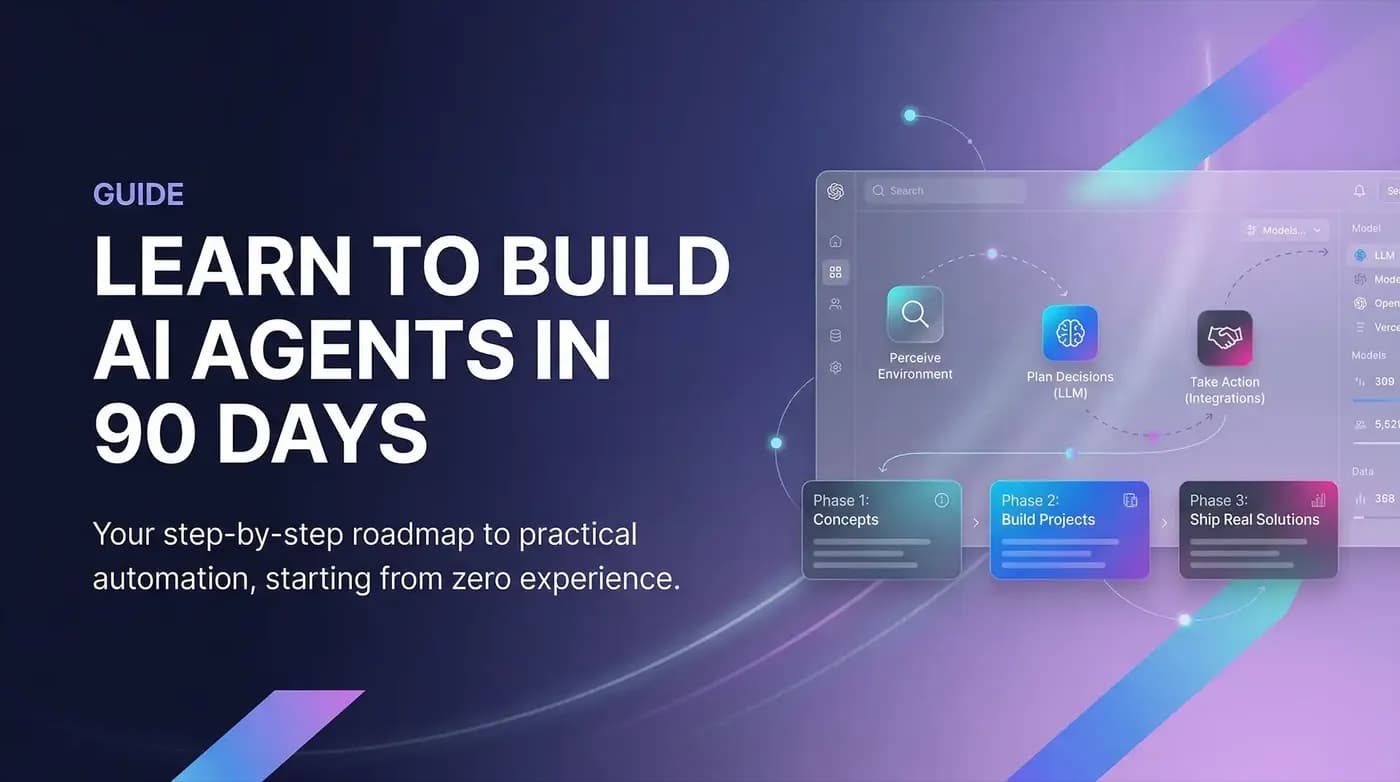
The agent loop has three components: it perceives the environment (reads your inbox), it decides what to do (drafts a reply using Claude), and it acts (saves the draft to Gmail). Then it loops. This is the sense-plan-act cycle.
Understanding this cycle is the conceptual foundation of everything else in this guide.
The 90-Day Roadmap: Three Phases
Phase 1 (Days 1 to 30): Foundations and Concepts
The goal of Phase 1 is to understand the conceptual architecture of AI agents without getting lost in code.
Week 1: Learn the sense-plan-act cycle. Understand the difference between chatbots and agents. Read about tools and tool-calling — how agents decide which external system to use.
Week 2: Learn about memory systems. Understand short-term memory (context window), long-term memory (vector databases, RAG), and external memory (connected databases and files). You do not need to build any of this yet — just understand why it exists.
Week 3: Learn about orchestration. How do multi-agent systems work? When does one agent hand a task to another? Study a few examples of agentic workflows in public tutorials.
Week 4: Survey the tools. Spend time with n8n, Flowise, and LangGraph. Do not build anything serious yet — just understand what each platform is for and where beginners typically start.
Free resources for Phase 1: Andrew Ngs AI for Everyone course (Coursera, free to audit), n8ns official YouTube channel, and Anthropics documentation on tool use.
Phase 2 (Days 31 to 60): Hands-On Building
The goal of Phase 2 is to ship three small agents. Each one should do one real thing.
Project 1 (Days 31 to 40): A simple email classifier. Connect Gmail to n8n. Add a Claude node. Build a workflow that classifies every incoming email into one of five categories and applies a Gmail label. This teaches you: triggers, API connections, LLM nodes, and conditional routing.
Project 2 (Days 41 to 50): A research assistant. Build an n8n workflow triggered by a web form input. The workflow uses Perplexity or the web search node to research the topic, passes the results to Claude to synthesize them, and delivers a structured report via email or Slack. This teaches you: sequential chains, prompt engineering for structured output, and delivery mechanisms.
Project 3 (Days 51 to 60): A RAG chatbot. Set up a Pinecone free account. Upload 5 to 10 documents about a topic you know well. Build a query workflow in n8n that takes a question, searches for relevant document chunks, and answers using only those chunks. This teaches you: embeddings, vector search, retrieval, and grounded generation.
After shipping Project 3, you understand the core components of 90% of AI agents in the wild.
Phase 3 (Days 61 to 90): Build Something Real
The goal of Phase 3 is to build one agent that solves a problem in your actual life or business — and share it publicly.
This is where most learners fail. They finish Phase 2 in a controlled tutorial environment and then build nothing real because they do not know what to build. The answer is: identify the most painful repetitive task in your current workflow and automate it.
Real examples from solopreneurs who completed this phase: a content repurposing agent that takes a published blog post and automatically generates social captions for each platform; a client communication agent that reads project brief emails and generates a structured discovery questionnaire; a competitive intelligence agent that monitors three competitor blogs and sends a weekly digest of new posts with AI-generated summaries.
The technical skills required for these agents are entirely within what Phase 2 teaches. The missing ingredient is clarity about what problem you want to solve.
What to Do After Day 90
After day 90, you have shipped four agents, understand the architecture of AI systems, and have a working foundation to go deeper in any direction: more complex orchestration with LangGraph or AutoGen, adding memory layers, building production-grade systems with proper error handling, or learning the API layer to build your own tools.
The next step depends on where you want to go. But the foundation is real and transferable.
FAQ
Do I really need zero coding experience to do this? Mostly yes. n8n and Flowise are visual, drag-and-drop tools. You will encounter some JSON configuration and a few API keys. None of it requires programming knowledge. You will write prompts, not code.
How much will this cost? The tools used in this guide have free tiers that cover all three months. Pinecone free tier, n8n cloud free tier, Claude free tier, and Perplexity free tier are sufficient to complete all three projects. If you want more usage, budget $20 to $40 per month.
What if I get stuck? Paste your specific error message into Claude or ChatGPT. Describe what you are trying to build. Ask what went wrong. This is how experienced builders debug — not by memorizing solutions, but by knowing how to get unstuck.
Is this enough to get a job in AI? It is enough to demonstrate practical competence and ship a real portfolio. Entry-level AI roles in 2026 are increasingly looking for builders who can show working projects, not just certificates.
Start Today, Not Monday
The biggest failure mode for self-directed learning is waiting for the perfect moment. Start with Week 1. Read about the sense-plan-act cycle. Watch two n8n tutorial videos. Open a free n8n account and click around.
The 90-day roadmap only works if Day 1 actually happens.

Learn to build AI workflows that handle your busywork — live sessions, real projects, zero code.
See the courseBeginner-friendly