.jpg&w=1080&q=75)
How to Build a No-Code AI Lead Scoring System Using Google Sheets & ChatGPT in 15 Minutes

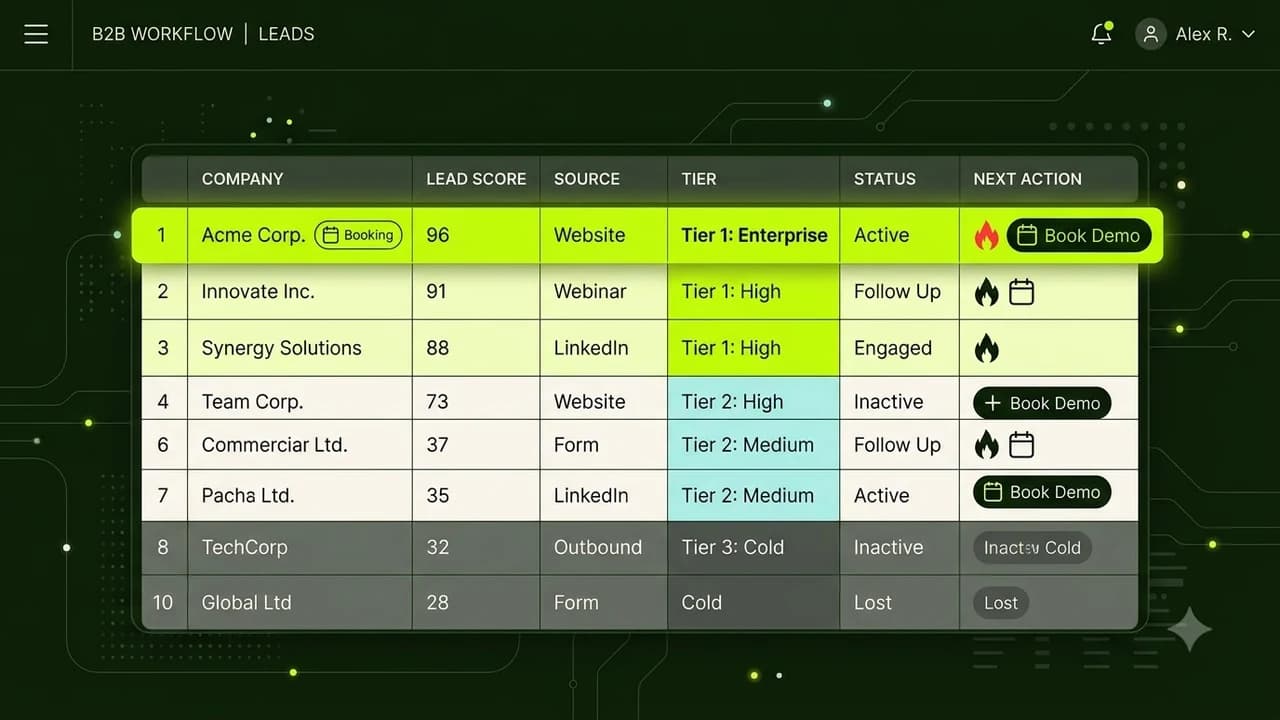
Indian agencies, consultants, and B2B founders can build an automated AI lead scoring pipeline in 15 minutes using Google Forms, Google Sheets, and ChatGPT to classify high-value buyers from tire-kickers without writing code.
Chasing every inbound inquiry manually wastes your sales team's energy. When someone fills out your contact form asking for services, you typically don't know if they are a high-ticket client with a ₹2,00,000 budget or a student looking for free advice until you spend 30 minutes on a discovery call.
Automating lead scoring allows you to rank inbound leads the second they submit a form. High-intent leads receive an instant VIP booking link, while unqualified inquiries are routed to self-serve resources.
Here is the exact step-by-step setup to deploy this system today.
The Difference Between Traditional & AI-Powered Lead Scoring
Traditional CRM lead scoring requires expensive enterprise software (like HubSpot Enterprise at ₹40,000/mo) and rigid rule-based logic. AI lead scoring uses natural language reasoning to evaluate the quality of what a lead actually wrote:
Evaluation Metric | Traditional Manual Review | No-Code AI Lead Scoring |
|---|---|---|
Speed to Score | 2 to 6 hours after submission | Under 10 seconds |
Evaluation Depth | Only checks simple fields (City, Budget range) | Analyzes problem description, company size, urgency, and tone |
Prioritization Action | Accountant or rep emails manually | Auto-tags lead as 'Hot', 'Warm', or 'Cold' with custom next steps |
Lead Loss Rate | High (Hot leads go cold waiting for a reply) | Near zero (Instant automated calendar invite sent to Hot leads) |
Tooling Cost | Enterprise CRM retainers | Completely free (Google Sheets + OpenAI API micro-credits) |
The 3-Step Setup Blueprint for Non-Coders
You can assemble this pipeline using free Google tools and a lightweight webhook:
Step 1: Create a High-Signal Google Form
Set up your inbound lead form with four essential questions:
- Name & Company Name
- Work Email & WhatsApp Number
- What is the primary challenge you need solved? (Open text box)
- What is your estimated timeline & budget range?
Link the Google Form to save submissions into a master Google Sheet.
Step 2: Set Up an Automated Webhook via n8n or Make.com
Create a new workflow that triggers whenever a new row appears in your Google Sheet.
Pass the submission data into an AI node with this scoring prompt:
"Analyze this inbound sales lead. Score the lead from 1 to 10 based on commercial intent, budget readiness, and problem urgency. Return a JSON response with: Score, LeadTier (Hot/Warm/Cold), and a 20-word Reasoning Summary."
Step 3: Route Next Actions Based on the AI Tier
Configure simple router paths based on the returned LeadTier:
- Tier 1: Hot Leads (Score 8-10): Instantly dispatch a WhatsApp message and email containing your direct Calendly booking link.
- Tier 2: Warm Leads (Score 5-7): Send an automated portfolio case study and invite them to answer two qualifying questions.
- Tier 3: Cold Leads (Score 1-4): Log into your archive sheet and send a polite email pointing to your free blog guides.
Why Speed to Lead Wins Deals in India
Studies in B2B sales show that responding to an inbound lead within 5 minutes increases conversion probability by 9x compared to waiting 30 minutes.
By letting an AI scoring model triage your inquiries in seconds, your sales team only spends their time talking to decision-makers who have real budgets and immediate needs.
Frequently Asked Questions
How much does it cost to score 500 leads per month?
Using official OpenAI API keys (GPT-4o mini), scoring a single lead costs approximately ₹0.04 (4 paise). Scoring 500 leads costs less than ₹25 per month.
Can this system integrate with WhatsApp lead forms?
Yes. You can connect WhatsApp Click-to-Chat questionnaires or Meta Instant Forms directly into the same Google Sheets scoring workflow.
Is there any risk of AI misclassifying a high-value client as cold?
To prevent false negatives, configure the prompt so that any lead with a corporate email domain (e.g. @tatamotors.com or @zomato.com) is automatically promoted to 'Hot' regardless of the text length.

Learn to build AI workflows that handle your busywork — live sessions, real projects, zero code.
See the courseBeginner-friendly