.jpg&w=1080&q=75)
How Solopreneurs Automate Customer Support Email Replies Using AI and Make.com

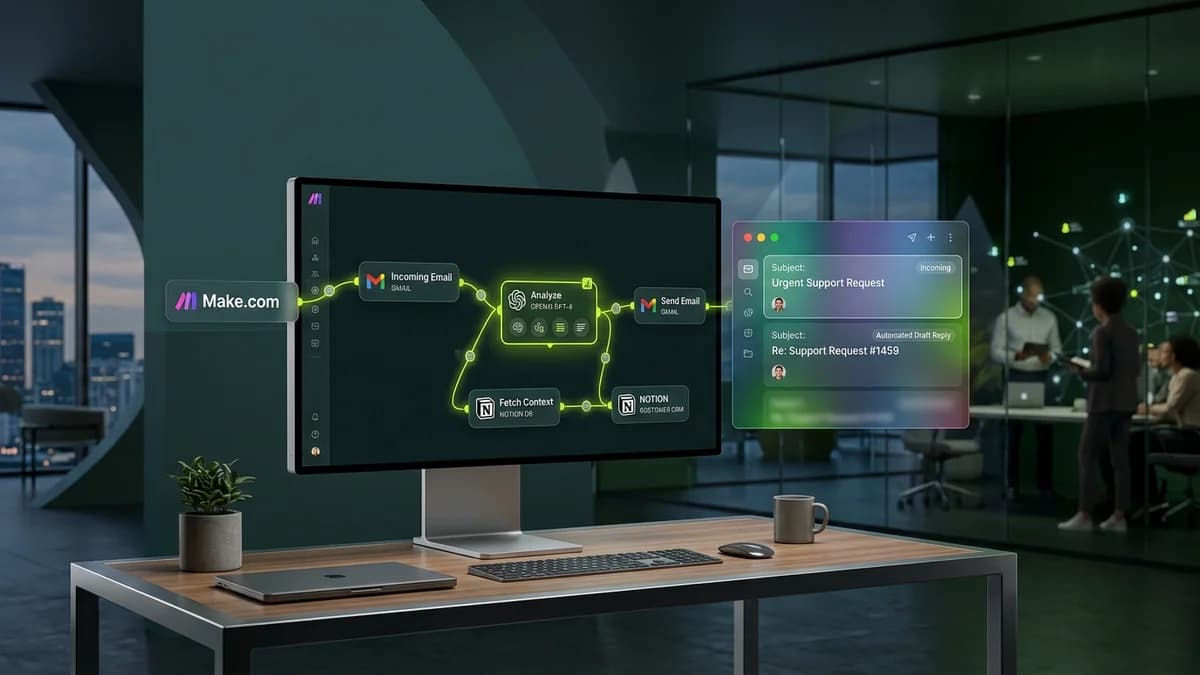
Solopreneurs can automate customer support email replies by linking Gmail to ChatGPT or Claude through Make.com, auto-drafting accurate FAQ answers and reducing manual inbox handling by 80%.
Managing customer support emails is one of the biggest daily time drains for solopreneurs, digital product creators, and small e-commerce store owners. Inbound inquiries regarding order tracking, refund policies, pricing tiers, and booking availability consume hours of manual typing each week. Delaying support responses leads to dissatisfied clients, while constant inbox monitoring fragments deep work.
An automated AI customer support email system solves this problem by drafting accurate responses instantly. Without writing code or hiring dedicated support agents, business owners can set up a visual workflow that reads incoming emails, references company FAQ guidelines, and prepares ready-to-send reply drafts automatically.
Why Manual Email Support Drains Solopreneur Growth
Handling customer support manually creates significant operational friction:
Support Metric | Manual Inbox Management | AI Automated Email Assistant |
|---|---|---|
Average Reply Delay | 6 to 24 hours | Under 3 minutes for draft preparation |
Daily Time Required | 2 to 3 hours spent typing | 10 minutes approving pre-written drafts |
Response Accuracy | Risk of typos or missed details during rush | Consistent compliance with FAQ guidelines |
Scalability Limit | Overwhelmed during sales launches | Handles high email spikes with zero lag |
3 Components of an Automated AI Support Assistant
Building a visual email automation requires connecting three simple modules:
[Incoming Email / Gmail] ──> [AI Knowledge & FAQ Matching] ──> [Gmail Auto-Draft Generation]Component 1: Email Intake & Filter Node
The workflow monitors your support inbox for new emails. Using basic filtering rules, non-support emails (such as newsletters, spam, or promotional updates) are filtered out automatically before triggering the AI step.
Component 2: Contextual AI Response Generation Prompt
When a valid customer email arrives, Make.com routes the message text to an AI node (ChatGPT or Claude) alongside your official company FAQ document:
AI Customer Support Prompt Blueprint:
"You are a helpful customer support representative. Reference the following Company FAQ Knowledge Base: {FAQ_Document}. Analyze the customer inquiry: {Customer_Email}. Write a polite, empathetic 3-paragraph reply answering their question accurately."
Component 3: Auto-Drafting & Human Approval Safety Gate
Rather than sending emails directly to customers automatically, the AI system creates a completed reply draft inside your Gmail inbox. This human-in-the-loop safety gate allows you to quickly scan, verify, and click "Send" in seconds.
Step-by-Step Setup Guide for Non-Technical Founders
Follow this practical step-by-step setup guide to launch your AI email support workflow:
- Prepare Your FAQ Document: Save your common customer questions, pricing details, and refund policies in a Google Doc or plain text file.
- Set Up a Make.com Scenario: Create a new scenario and select Gmail as your trigger module for "Watch Emails".
- Add the OpenAI / Anthropic Module: Choose the "Create a Completion" module and paste your FAQ prompt template.
- Configure Draft Email Action: Add a Gmail "Create a Draft" action step, setting the recipient as the original sender and inserting the AI-generated text.
Frequently Asked Questions (FAQs)
Will customers realize the email draft was written by AI?
No. Because the prompt instructs the AI model to follow your specific tone of voice and use official FAQ data, responses sound polite, human, and professional.
Is it safe to automate customer support email replies?
Yes. By routing generated responses into your Gmail "Drafts" folder instead of auto-sending them immediately, you retain 100% control to review every email before it reaches the customer.
How much does it cost to run an AI email support assistant?
Setting up this workflow using Make.com and the ChatGPT API typically costs under $5 per month for small businesses handling hundreds of support inquiries.

Learn to build AI workflows that handle your busywork — live sessions, real projects, zero code.
See the courseBeginner-friendly