.jpg&w=1080&q=75)
How Indian Agencies Automate Client Onboarding With AI and WhatsApp (2026)

Indian agencies can reduce client onboarding friction by 80% using automated WhatsApp AI workflows — delivering contracts, collecting brand assets, and scheduling kickoff calls in under 15 minutes without human delays.
Client onboarding is often the most disorganized phase in an Indian service business. After closing a deal, founders frequently subject new clients to disjointed email chains, confusing Google Drive folders, and delayed document signatures. This initial friction triggers buyer remorse and stalls project timelines before work even begins.
The Cost of Broken Onboarding in Indian Creative & Tech Agencies
When an onboarding sequence relies on manual emails and scattered Slack messages, projects hit immediate bottlenecks:
- Clients take 7 to 12 days just to upload logos, brand colors, and account access
- Account executives waste 4 to 6 hours repeatedly chasing missing credentials
- Kickoff meetings get rescheduled twice because intake questionnaires sit half-completed
- Founders spend valuable weekend hours hand-crafting welcoming agreements
Modern no-code AI systems bridge this communication gap by meeting Indian clients on the platform they open 30 times a day: WhatsApp.
The 4-Step Automated Onboarding Blueprint
Step 1: Deal Won Trigger from Payment or CRM
The onboarding engine starts the moment a client pays their retainer invoice or signs a proposal.
In your no-code automation hub (such as Make.com or n8n), create an instant trigger from your payment gateway (Razorpay or Cashfree) or CRM (Zoho or HubSpot). The trigger extracts the client's registered name, WhatsApp phone number, company name, and purchased service package.
Why Immediate Automation Prevents Buyer Remorse
Behavioral psychology shows that customer enthusiasm peaks at the exact moment of payment. An automated WhatsApp welcome message arriving within 90 seconds reinforces trust, proving that your agency operates with world-class operational speed.
Step 2: Interactive WhatsApp Asset Intake Bot
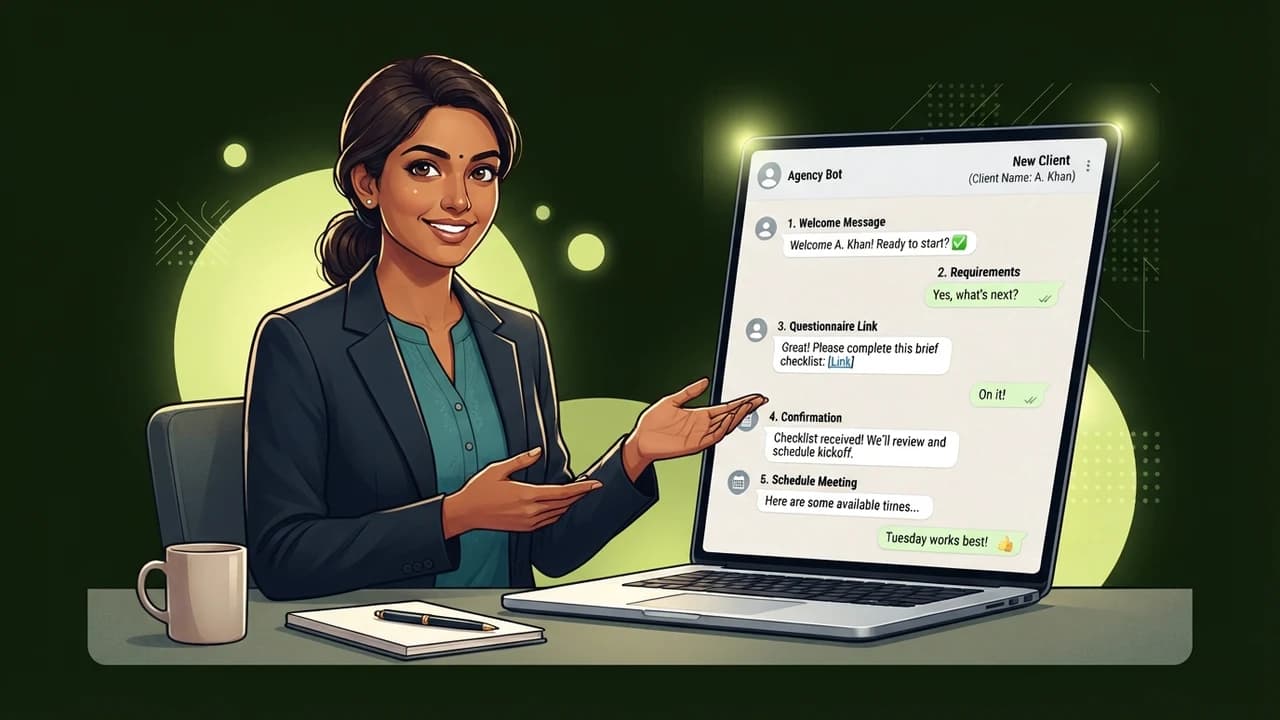
Rather than emailing a 20-question form that clients ignore, your automated WhatsApp bot guides them through a friendly conversational questionnaire:
- Brand Identity: Prompts the client to send their high-res logo file directly in the chat
- Access Passwords: Sends an encrypted, single-use credential link for Google Analytics and Meta Ad Account access
- Core Goals: Asks the client to send a 60-second voice note detailing their top product launch priority for the quarter
The AI module transcribes the voice note via Whisper, formats the key takeaways into bullet points, and files them into the project repository automatically.
Step 3: Instant Shared Folder & Task Architecture Creation
While the client interacts with the WhatsApp bot, your background automation orchestrates your internal team workspace:
- Generates a structured Google Drive directory: /Clients/[Client Name]/Brand Assets/
- Automatically deposits the logo and images uploaded via WhatsApp into the folder
- Clones a pre-built project template in Notion, Trello, or ClickUp
- Assigns designated team members based on the selected package deliverables
Step 4: Frictionless Kickoff Call Scheduling
Once all required brand assets are verified by the AI validator, the WhatsApp bot sends an integrated booking link:
"Everything looks complete! Here is the calendar link to lock in your strategy kickoff call with our team this Thursday: [Calendar Link]. We are excited to build with you."
The client selects a slot in 10 seconds without back-and-forth scheduling emails.
Comparison: Traditional Manual vs Automated WhatsApp Onboarding
Onboarding Parameter | Traditional Email Process | Automated WhatsApp AI Workflow |
|---|---|---|
Time to complete intake | 5 to 10 days | Under 2 hours |
Team hours spent per client | 8 – 12 hours | Under 30 minutes |
Asset collection completion | Often missing high-res files | 98% complete on day one |
Client satisfaction score | Average (frustrated by delays) | High (delighted by effortless speed) |
Tooling cost | High labor overhead | <₹1,500/month in software |
Setting Up the Automation Without Hiring Developers
You do not need a dedicated technical team to launch this system. With an active WhatsApp Business API line connected through providers like Wati or Interakt, combined with n8n or Make.com, non-technical agency managers can assemble the full sequence in an afternoon.
The team at Zero To AI provides step-by-step practical implementation roadmaps tailored for non-coder Indian business operators. Browse our library of actionable frameworks at [zerotoai.in](https://zerotoai.in).
Frequently Asked Questions (PAA)
Is WhatsApp safe for collecting sensitive client credentials?
Do not ask clients to type raw passwords directly into plain chat messages. Instead, have your WhatsApp bot send a secure one-time password submission link (such as 1Password or Privnote) that auto-expires after viewing, ensuring bank-grade protection.
What happens if a client uploads a low-resolution logo?
You can connect an AI vision module in your workflow that checks uploaded image resolution. If the logo width is below 1000 pixels, the bot immediately replies: "This image looks slightly compressed. Please share the original document or PDF file so our designers have vector clarity."
Which WhatsApp tool works best for agency onboarding in India?
Wati and Interakt are excellent choices for Indian agencies due to their intuitive drag-and-drop conversational builders, simple webhook integrations, and reliable Indian customer support teams.
Can this workflow integrate directly with Zoho CRM or Google Drive?
Yes, using visual integration tools like n8n or Make.com, incoming files and conversational answers flow directly into your Google Drive folders and update corresponding deal records in Zoho CRM without manual typing.

Learn to build AI workflows that handle your busywork — live sessions, real projects, zero code.
See the courseBeginner-friendly