.jpg&w=1080&q=75)
How to Build a WhatsApp AI Bot for Your Business Without Coding (2026 Guide)

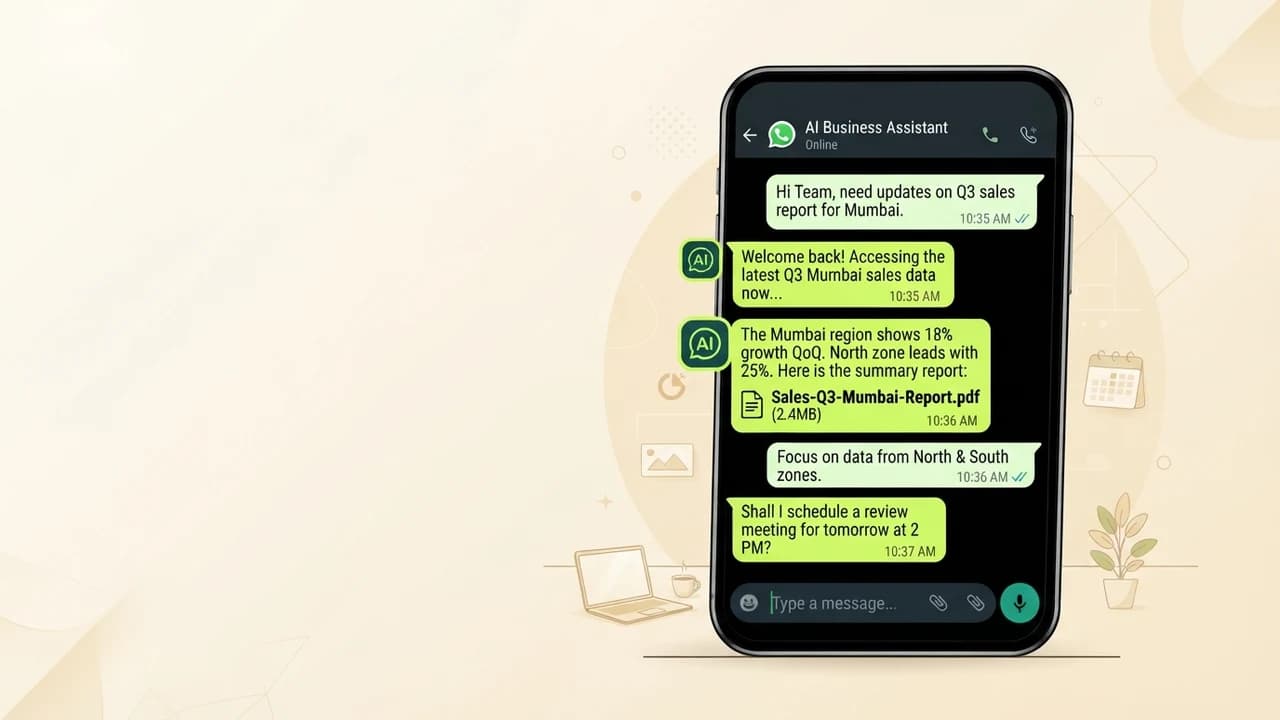
You can build a WhatsApp AI bot for your Indian business in under 2 hours using no-code tools — it will handle customer FAQs, bookings, and follow-ups 24 hours a day without any developer or technical setup.
WhatsApp has 500 million active users in India. For most Indian businesses — from kirana stores and coaching institutes to D2C brands and service agencies — WhatsApp is the single most important customer communication channel. But responding to 50-100 messages per day manually creates burnout, missed leads, and inconsistent customer experience.
A WhatsApp AI bot solves this entirely. Here is the exact process to build one without writing a single line of code.
Why WhatsApp Bots Work Particularly Well in India
WhatsApp open rates in India consistently exceed 90%. Compare this to email (22% average open rate) or push notifications (under 10%). When a customer gets a WhatsApp message, they read it — almost always within minutes.
Indian customers prefer WhatsApp for:
- Order status updates from D2C brands
- Appointment confirmations from clinics, salons, and coaching institutes
- Payment receipts and GST invoices
- Product catalog browsing via WhatsApp Business Catalog
- Customer support queries that would otherwise require a phone call
An AI bot handles all of the above automatically, 24/7, in both English and Hindi.
Step-by-Step: Build Your WhatsApp AI Bot Using Wati and ChatGPT
Step 1: Get WhatsApp Business API Access
The regular WhatsApp Business App does not allow bots. You need WhatsApp Business API, available through approved Business Solution Providers (BSPs) in India.
Recommended Indian BSPs:
- Wati — ₹2,499/month, easiest for beginners, strong Hindi support
- Interakt — ₹999/month starter, good for small volume
- AiSensy — ₹1,499/month, strong broadcast features
Sign up, verify your Facebook Business Manager account, and submit your business details. Approval typically takes 24-48 hours.
What Documents Do You Need for WhatsApp API Approval?
You need a valid Indian business entity (GST registration, shop registration, or sole proprietor certificate), a business phone number not currently registered on any WhatsApp account, and a Facebook Business Manager account. The BSP guides you through each step.
Step 2: Create Your Chatbot Conversation Flow
Inside Wati, go to Chatbot Builder — a visual flowchart builder, no code, just drag and drop. Create your first flow: customer sends a message → bot reads the message → bot responds based on keywords or intent.
Start with 5 fundamental flows:
- Welcome message (triggered when anyone messages for the first time)
- FAQ response (triggered by keywords like "price," "timing," "location")
- Appointment booking (guided conversation with date/time options)
- Order status (connects to your backend or directs to tracking link)
- Escalation to human (when bot cannot answer, handoff to your staff)
How to Write the Welcome Message
Your welcome message sets the tone. Keep it under 60 words, warm but professional. Include a quick reply menu with 3-4 options: "Pricing," "Book an Appointment," "Track My Order," "Talk to Team."
Step 3: Add AI Intelligence With ChatGPT Integration
Basic keyword-based bots can only answer pre-written questions. Adding ChatGPT makes your bot conversationally intelligent — it understands questions it has never seen before and generates natural responses.
In Make.com (free plan), build this automation:
- Trigger: New WhatsApp message received via Wati webhook
- Filter: Only if message is NOT a quick reply button click
- Action: Send message text to OpenAI API with your business context as system prompt
- Action: Send OpenAI's response back to the customer via Wati API
Your system prompt should describe your business clearly and instruct the AI to stay within factual bounds — never making up prices or service details.
Step 4: Test Your Bot Thoroughly Before Going Live
Send 20 different test messages from a separate phone number before making the bot public. Test obvious FAQ questions, unusual questions the bot might not understand, Hindi questions if you serve Hindi speakers, and edge cases like emoji-only messages.
Check every response for accuracy. If the AI gives wrong information, refine your system prompt.
How Much Does a WhatsApp AI Bot Cost in India?
Component | Tool | Monthly Cost |
|---|---|---|
WhatsApp API Access | Wati Starter | ₹2,499 |
AI Intelligence | ChatGPT API (~500 conversations) | ₹200-500 |
Automation Connector | Make.com Free | ₹0 |
Total | — | ₹2,700-3,000 |
For a business handling 50+ customer inquiries per day, this replaces 2-4 hours of daily staff time — saving ₹15,000-30,000/month at a ₹100-150/hour staff rate.
Common Mistakes Indian Business Owners Make With WhatsApp Bots
- No Hindi support: If your customers are from Tier 2 cities, add Hindi language flows from Day 1
- No human handoff: Always add a "Talk to Team" escape route — customers get frustrated when stuck with a bot that cannot help
- Sending too many broadcasts: WhatsApp penalizes spam-like behavior; keep broadcasts relevant and opt-in only
- Not updating the FAQ database: Your bot's knowledge gets stale — schedule a monthly review of the most common unanswered questions
Zero To AI has a free WhatsApp bot setup checklist at [zerotoai.in](https://zerotoai.in) — download it before you start building to avoid the most expensive beginner mistakes.
Frequently Asked Questions (PAA)
Do I need a developer to build a WhatsApp AI bot in India?
No. Tools like Wati, Interakt, and AiSensy provide no-code chatbot builders designed for non-technical business owners. You can build and deploy a functional bot in 2-4 hours using their visual flowchart editors, with no coding knowledge required.
How long does WhatsApp Business API approval take in India?
Approval typically takes 24-72 hours when you apply through an approved BSP like Wati, Interakt, or AiSensy. You need a valid Facebook Business Manager account and an Indian business registration document. The BSP handles most of the submission process for you.
Can a WhatsApp bot respond in Hindi?
Yes. Both keyword-based flows and AI-powered responses (using ChatGPT API) support Hindi and Hinglish. You can set up separate conversation flows for Hindi and English, or use an AI model that auto-detects language and responds accordingly.
What is the cheapest way to set up a WhatsApp bot for a small business?
The most affordable setup is Interakt's starter plan (₹999/month) combined with Make.com's free automation tier and ChatGPT's free API credits for the first month. Total cost: approximately ₹1,000-1,200 for the first month.

Learn to build AI workflows that handle your busywork — live sessions, real projects, zero code.
See the courseBeginner-friendly