.jpg&w=1080&q=75)
How Indian Solopreneurs & Agencies Use AI to Automate Invoicing and Client Follow-ups

How Indian Solopreneurs & Agencies Use AI to Automate Invoicing and Client Follow-ups
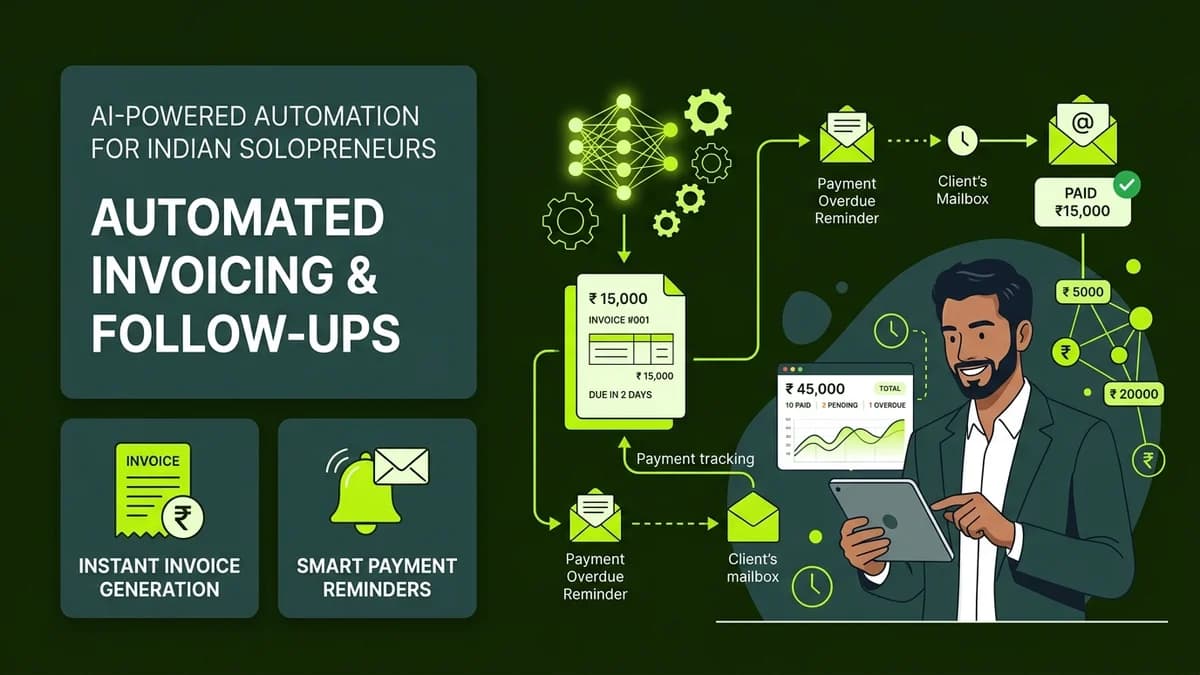
Indian solopreneurs, agency owners, and freelancers can eliminate overdue client payments and manual billing tasks by deploying automated no-code AI workflows that extract payment data, generate GST invoices, and send polite follow-ups.
Managing cash flow is one of the biggest operational hurdles for independent professionals. Studies show that Indian freelancers and boutique agency owners spend up to 10 hours every week writing manual invoices, calculating taxes, and sending awkward payment reminder messages to clients.
By combining simple no-code platforms like Make.com or Zapier with AI writing tools, non-technical business owners can create a self-running financial assistant that ensures you get paid on time without damaging client relationships.
Automated Financial Workflow Comparison
┌─────────────────────────────────────────────────────────────┐
│             AUTOMATED AI FINANCIAL WORKFLOW PIPELINE        │
│                                                             │
│  [Project Marked Complete] ──> [AI Generates GST Invoice]   │
│                                           │                 │
│                                           v                 │
│  [Payment Received]  <───  [Automated Email/WhatsApp Reminders]│
│         │                                                   │
│         v                                                   │
│  [Receipt Sent and Accounting Sheet Updated]                │
└─────────────────────────────────────────────────────────────┘
Here is how an automated AI financial workflow compares against traditional manual billing:
Operational Metric | Manual Invoicing and Reminders | Automated AI Financial Workflow |
|---|---|---|
Weekly Time Spent | 8 – 12 hours/week | Under 15 minutes/week |
Average Days to Payment | 25 – 45 days overdue | 5 – 10 days prompt payment |
Human Error Risk | High (Missing GST numbers, miscalculations) | Zero (Automated data validation) |
Client Relationship Friction | High (Awkward manual reminder texts) | Low (Polite, scheduled AI messages) |
Monthly Software Cost | Rs 3,000 – Rs 10,000 (Accounting firm) | Rs 0 – Rs 1,500/month (No-code stack) |
5 Steps to Automate Your Billing and Payment Reminders
- Create a Centralized Project Tracker: Set up a free Airtable or Notion database listing active client projects, agreed milestones, and billing amounts.
- Connect an Automated Invoice Trigger: Configure Make.com or Zapier to trigger when a project status changes from "In Progress" to "Delivered".
- Generate PDFs Automatically: Use Google Docs templates or Razorpay/Zoho Invoice integrations to create GST-compliant invoice PDFs automatically.
- Draft Polite AI Reminder Sequences: Use ChatGPT or Claude to write a 3-part reminder email and WhatsApp sequence (sent at 3 days before due date, on due date, and 5 days overdue).
- Auto-Reconcile Received Payments: Connect bank payment webhooks (like UPI or Razorpay) so that when a client pays, the system updates the status to "Paid" and stops further reminders automatically.
Strategic Benefits for Independent Professionals
- Improved Cash Flow Predictability: Automated reminders increase prompt payment rates by up to 65%, ensuring predictable monthly revenue.
- Professional Brand Perception: Sending clean, automated PDF invoices with professional payment links establishes enterprise-level credibility.
- Elimination of Follow-up Awkwardness: System-driven notifications remove personal awkwardness when asking long-time clients for overdue payments.
- Simplified Tax Accounting: Automatically organizes income data into structured spreadsheets for easy filing during quarterly tax returns.
Frequently Asked Questions (PAA)
Can I build an automated invoice system without knowing how to code?
Yes! Tools like Zapier, Make.com, Airtable, and Zoho Invoice provide simple visual interfaces where you can link your project management app to payment channels in minutes.
How does the AI ensure follow-up messages stay polite?
You control the prompt instructions given to the AI. You can specify that reminders maintain a warm, professional, and courteous tone while clearly stating payment due dates and UPI links.
Is AI financial automation secure for small businesses?
Yes. Secure API connections utilize bank-level 256-bit encryption. Payment gateways like Razorpay and Stripe handle payment processing directly, ensuring sensitive financial data is protected.
How much can a solopreneur save by automating invoicing?
Solo agency owners save approximately 30 to 40 hours of manual administrative labor every month, translating to thousands of rupees in saved time that can be redirected toward billable client work.
Practical Steps to Get Started Today
- Draft standard pricing and billing terms into a single reusable text document.
- Start by automating just your payment reminder emails before building full end-to-end billing pipelines.
- Test payment links thoroughly with small transactions before sending invoices to enterprise clients.

Learn to build AI workflows that handle your busywork — live sessions, real projects, zero code.
See the courseBeginner-friendly